 Jamavac

By default Firefox enable automatic updates for Installed add-ons (Plugins or Extensions) and Firefox version. When a new or updated version is detected, by default Firefox will automatically download and install the upgrades or updates. This feature is very useful if any new version of installed add-ons (Plugins or Extensions) on Firefox.
But the problem that I often experience is my Firefox crashes after update. This may be due to some updates that are not compatible. This may be caused by some of the downloadable updates are not compatible.
To stop and disable automatic update on Firefox browser you can follow these steps:

But the problem that I often experience is my Firefox crashes after update. This may be due to some updates that are not compatible. This may be caused by some of the downloadable updates are not compatible.
To stop and disable automatic update on Firefox browser you can follow these steps:
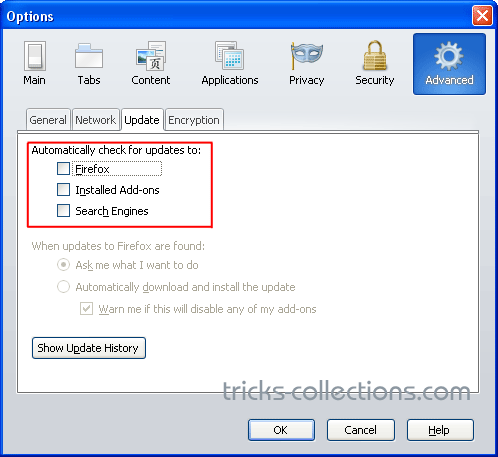
- Click tools menu then click Options.
- Open advanced tab then click update sub-tab.
- Untick the check boxes on: Firefox, Add-ons and Search Engines then click Ok.


Tidak ada komentar:
Posting Komentar